AI Products
Cutout Studio
A background-removal tool hardened into a verified beta with moderation, audit logging, and no image retention by default.
2026 / AI Products / React / TypeScript / Express / PostgreSQL / OpenAI / ONNX
Quick read
A clear breakdown of the product, the reasoning behind it, and the implementation choices that matter.
- Year
- 2026
- Category
- AI Products
- Status
- Beta hardening complete
Product experience
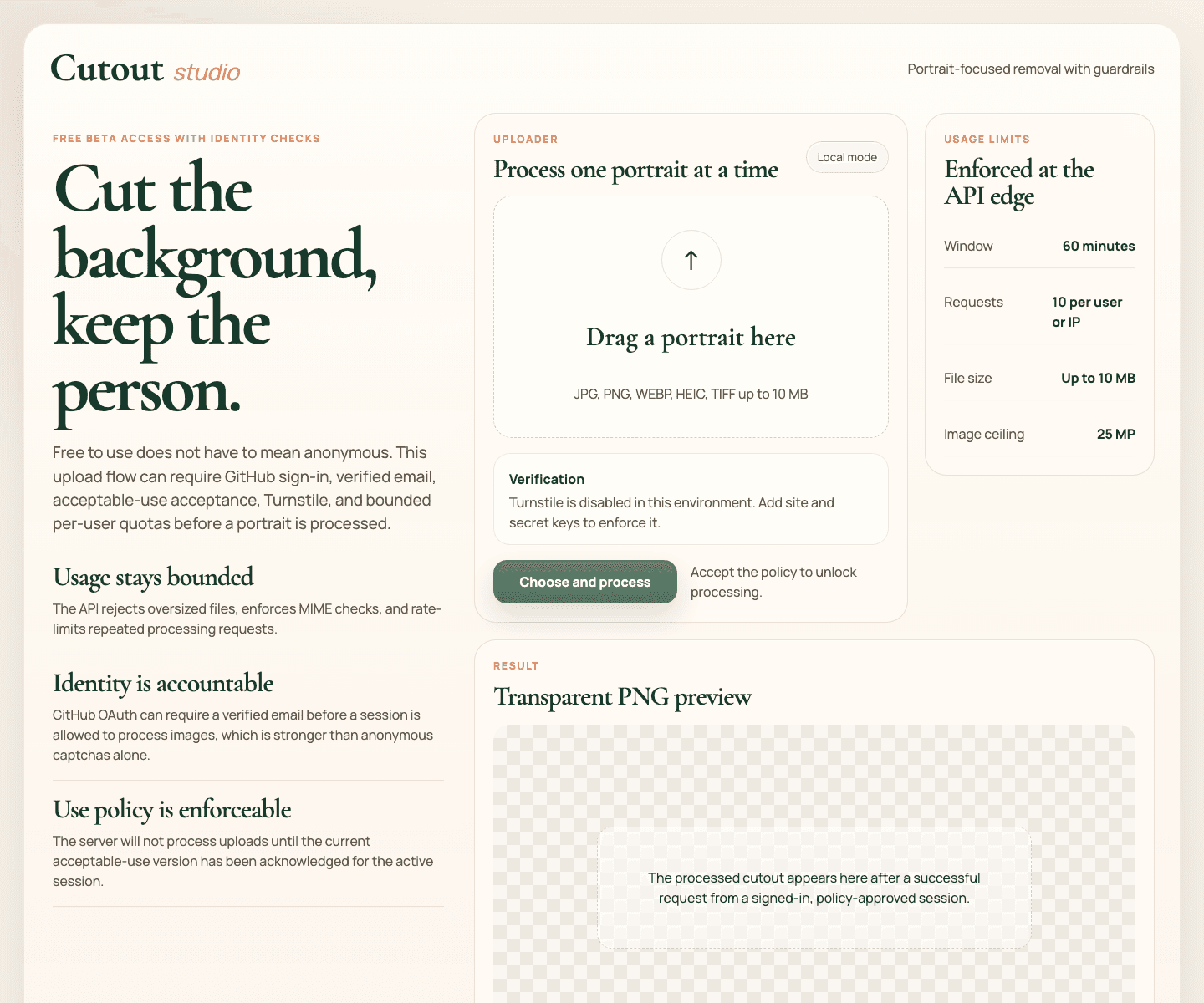
The desktop hero shows the full workspace. This mobile capture keeps the same access, policy, moderation, limits, and result state legible in a narrow layout.

Overview
Cutout Studio started as a person-focused background-removal tool and then had to be shaped into something safer to operate as a public beta. The product now combines a React and TypeScript frontend, an Express API, local ONNX-based segmentation, GitHub verified-email access control, policy acceptance, moderation-before-processing, abuse reporting, admin review paths, structured audit logging, and a Postgres-backed session and user model.
Why it exists
A simple image utility becomes much less simple once it is exposed to the public. Anonymous uploads, unclear account state, no moderation gate, and weak logging all make a background-removal service easier to abuse.
How it works
Cutout Studio treats the launch as an accountable beta instead of an anonymous free tool. It requires verified GitHub login for processing, persists user and policy state in Postgres, runs moderation before background removal, fails closed on safety-critical uncertainty, keeps raw images out of durable storage, and gives operators a minimal review surface for abuse reports and account actions.
Built with
React / TypeScript / Express / PostgreSQL / OpenAI / ONNX
What I focused on
- Moved from an in-memory access model to durable Postgres-backed users, sessions, policy acceptances, audit events, abuse reports, and moderation decisions.
- Added moderation-before-processing, strict fail-closed behavior, abuse reporting, and admin-only account review actions.
- Kept the privacy posture narrow by processing images in memory and persisting only metadata, request identifiers, and decision codes.
- Built a product-facing safety flow with verified GitHub login, policy gating, request correlation IDs, and clearer rejection states.
What I built
The product combines a React and TypeScript client, an Express API, local ONNX-based person segmentation, verified GitHub sign-in, policy acceptance, optional Turnstile verification, moderation, rate limits, and a Postgres-backed operational model. The point was to make a narrow image utility accountable enough to run as a beta, rather than treating the model call as the whole product.
- The processing endpoint checks session, CSRF, account state, current policy acceptance, verification when configured, moderation, payload validation, and rate limits before the cutout pipeline runs.
- The result is a transparent PNG returned directly to the user instead of a durable image record.
- A small admin surface supports account status changes and review of abuse reports and relevant operational events.
Safety and trust
The beta flow is intentionally explicit: GitHub sign-in can require a verified email, the current acceptable-use version must be accepted, and moderation runs before background removal. The repository documents rejection for unauthenticated, blocked or review-required accounts, missing or stale policy acceptance, failed Turnstile when enabled, blocked or uncertain moderation decisions, and provider failure when fail-closed moderation is configured.
- Raw uploads are processed in memory; output PNGs are returned directly and are not persisted by default.
- The durable record is limited to operational metadata such as request identifiers, digests, status codes, moderation decisions, audit events, policy acceptance, and abuse reports.
- The data store supports active, blocked, and review-required account states, with a minimal admin review queue for relevant events and reports.
Architecture and data lifecycle
portrait upload
      |
verified session + policy state + optional Turnstile
      |
moderation decision
      |
local ONNX person segmentation
      |
transparent PNG returned directly

Postgres: users, sessions, policy acceptance, audit events, moderation decisions, abuse reports
No raw upload or output PNG retention by defaultTesting and deployment
The repository’s CI workflow installs from lockfile, runs the test suite, builds the product, verifies the generated Sites runtime, and runs an npm audit at the moderate threshold. The hardening tests cover durable-auth configuration, CSRF checks for signed-in writes, processing rejection paths, moderation fail-closed behavior and logging, abuse report creation, readiness degradation, and admin account-review actions.
Current beta posture
The public project and source are available as a beta demonstration. The repository is clear that the strict verified flow depends on the relevant production configuration for GitHub OAuth, managed Postgres, moderation, Turnstile, and the canonical site URL. Without those values, the published runtime is designed to render the app shell and fail closed rather than process images without the required controls.